Agenda
Scheduling & Session Management
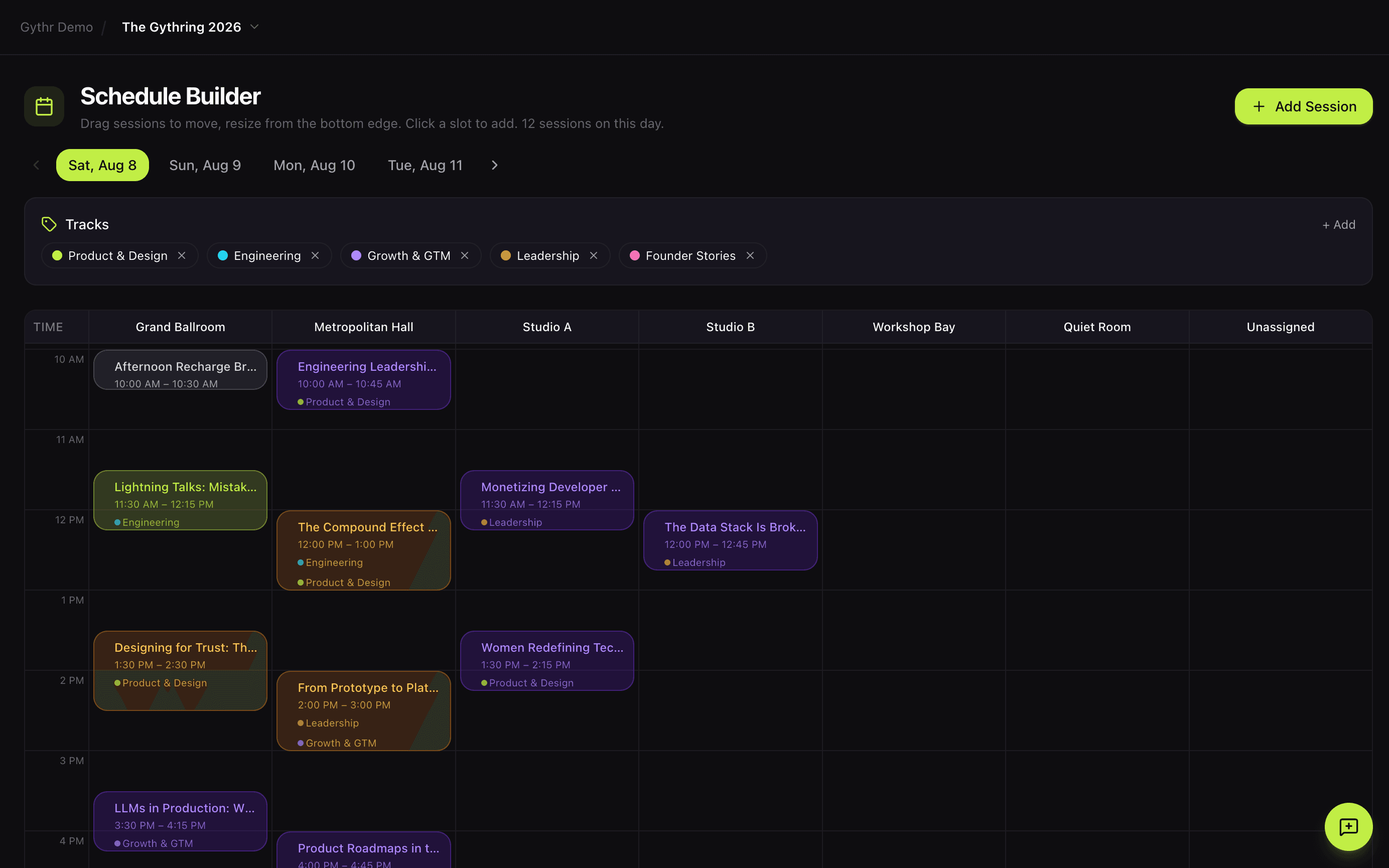
Agenda gives you a visual, drag-and-drop schedule builder where every session connects to the rest of your stack. Changes in Agenda flow to your speakers, your attendees, your analytics, and your stage hosts automatically. No spreadsheet. No PhD required.
The Problem
Scheduling an event shouldn't require a spreadsheet PhD.
You're managing sessions in a spreadsheet, emailing speakers every time a time changes, and praying nothing overlaps. Attendees get a static PDF schedule that's outdated before your opening keynote starts. When you move a session, six things break and you don't find out until someone walks to the wrong room.
Agenda replaces all of it with a connected schedule that updates itself.
Session scheduling is manual and conflict-prone
Attendees can't personalize their schedule or find what matters to them
Schedule changes trigger a cascade of manual updates across every other tool you use
How Agenda Works
One visual builder. One data layer. Every change flows to the rest of your stack.
Build visually
Drag and drop sessions onto a timeline grid. Room columns, hourly rows, day tabs. Click to edit, drag to move, resize to adjust duration. Assign tracks, pick a session type, set capacity. Snaps to 15-minute increments.
Publish and personalize
Your public schedule goes live the moment you hit publish. Attendees can filter by day, track, room, or session type. Tap into a session detail view with the full description, speakers, room, and any tags you've added. Bookmark sessions for later.
Connect the rest of the stack
When you update a session, every other module knows. Speakers get notified through Stage. Registered attendees see the change in Gythr Here. Signal updates its forecasts. Comms can send automated notifications. One change, one update, everywhere.
Built into Agenda
Host Cards. The last thing you'd think to automate. The first thing you'll be grateful for.
Every conference has the same 2 AM moment. You're sitting at your kitchen table two nights before the event, writing intros for stage hosts you barely know, trying to phonetically spell a speaker's last name, trying to figure out how to pivot gracefully from a keynote to a sponsor mention. Nobody talks about this part of the job. Everyone does it.
Host Cards fixes the whole thing in one click.
How Host Cards work
Agenda already knows your sessions, your speakers, your rooms, and your sponsors. Host Cards takes all of it and generates a printable host script for every session in every room. Each card includes:
- The session title, time, and location
- A written intro for the speakers, phonetic pronunciations included
- Transition language to move the audience from one moment to the next
- Sponsor logos and messaging on the back of each card
- Any custom information you want your host to mention
You review and edit every card before printing. The AI gives you a starting point. You bring the final word.
Export and print, anywhere
Host Cards export as a print-ready PDF. Two cards per page, landscape format, ready to cut. Print them yourself on a standard printer or send the PDF to a local print shop. No design work. No formatting headaches. No 2 AM panic.
The sponsor deliverable that fulfills itself
Every Host Card has a sponsor logo on the reverse side. When Agenda connects to Partners, sponsor logos are pulled automatically based on the sponsorship tier each sponsor purchased. Your Gold sponsors appear on every card. Your Silver sponsors appear on the cards you configure. Your Bronze sponsors get their own placements.
This means every time a stage host picks up a card to introduce a session, a tiered sponsor brand is in their hand. You never coordinate a placement. Partners tracks the fulfillment automatically. And when a sponsor asks "what did we actually get for our investment?", you can show them the exact count of physical, in-session brand impressions their tier earned, generated without you lifting a finger.
This is what sponsor fulfillment looks like when your schedule, your sponsors, and your stage are actually the same platform.
Host Cards. Because the details your audience never sees are the ones that make your event feel professional.
Everything Agenda Can Do
Drag-and-drop schedule builder
Visual timeline grid with hourly rows and room columns. Drag sessions between rooms and times. Resize to change duration. Snaps to 15-minute increments.
Multi-track support
Create unlimited tracks with custom colors. Assign sessions to multiple tracks. Filter the public schedule by track, room, day, or type.
Session types
Keynote, panel, workshop, break, networking, and custom session types, each with its own color badge for instant visual recognition.
Public schedule page
A beautiful, interactive schedule for attendees. Filter by day, track, room, or type. Tap any session for the full detail view with speakers, description, and tags.
Session detail pages
Every session opens into a rich detail view: description, room, time, speakers, track, and any custom tags you've added. Works on any device.
Capacity and RSVP management
Set capacity limits on sessions for workshops, roundtables, and breakouts. Auto-confirm or waitlist. Real-time spot counts so attendees know what's still available.
Room management
Create rooms with name, capacity, and location. Rooms become columns in the schedule builder for visual space planning.
Host Cards (AI-assisted)
Generate printable host scripts for every session. Review, edit, export as PDF. Two cards per page, landscape, ready to print and cut.
Connected Modules
When you change a session in Agenda, everything else in Gythr updates with it.
Stage
Speakers are assigned to sessions with per-session roles (speaker, moderator, panelist, host). Every session detail flows into the speaker portal automatically.
Gate
Registered attendees automatically see the full schedule and can bookmark sessions. Capacity-limited sessions manage waitlists based on registration data.
Signal
Session bookmarks, capacity utilization, and attendance patterns feed into Signal so you can see which sessions are hot before they even happen.
Comms
Session changes can trigger automated email notifications to affected attendees, speakers, or volunteers.
Crew
Assign volunteers and staff to specific rooms so your team knows where they're needed at every moment of the event.
Gythr Here
The public schedule attendees see lives inside Gythr Here. Bookmarks sync. Session details update in real time. No separate app to manage.
Agenda is included on every plan, including Free.
Build unlimited sessions, unlimited tracks, unlimited rooms, and unlimited Host Cards. The Host Card Generator unlocks on Business.
Book a demo →Gythr Agenda vs Sessionize
| Feature | Gythr Agenda | Sessionize |
|---|---|---|
| Schedule builder UI | Visual drag-and-drop grid with room columns and hourly rows | Form-based session entry with a generated grid view |
| Multi-track support | Unlimited tracks with custom colors, sessions can belong to multiple tracks | Tracks supported; session-to-track mapping is single-select |
| Room and capacity management | Rooms with name, capacity, location; capacity limits per session with waitlists | Rooms supported; capacity handling is lighter |
| Attendee personal schedules | Bookmarks, RSVPs, and .ics export built in for logged-in attendees | Requires a separate attendee app or a third-party integration |
| Timezone handling | Event timezone stored per event, sessions display in event time, stored as UTC | Timezone-aware, UTC storage, similar model |
| Speaker module integration | Speakers assigned via Stage with per-session roles, sync into schedule automatically | Tight speaker integration within Sessionize, but isolated from your registration and analytics |
| Live updates across the platform | One event bus: session changes flow to attendees, speakers, Signal, and Comms | Export to third-party tools for downstream updates |
Frequently asked questions
How do attendees build their personal schedule?
Does Agenda handle capacity limits and waitlists?
Can I export the schedule to a calendar?
How does Agenda handle multi-track events?
What happens when I move a session?
Do session times honor the event timezone?
Your schedule deserves better than a PDF.
Book a demo and see the first event platform where your schedule actually connects to the rest of your stack.