Crew
Volunteers & Staff
Crew is volunteer and staff management built into the same system as your event. Public applications, AI-assisted scheduling, self-service portals, task assignments, and a day-of operations dashboard. No spreadsheets. No Google Forms. No chasing people down in a group chat.
The Problem
Volunteer coordination shouldn't live in a spreadsheet.
You opened Google Sheets on Monday. By Wednesday you had three tabs: one for the volunteer list, one for the shift schedule, and one for the tasks. By Friday you had a group chat with 40 volunteers asking questions you already answered in the spreadsheet. On event day, the spreadsheet is open on your laptop, outdated by 9:15 AM, and half your volunteers don't know where to go.
Meanwhile, the volunteers themselves are wondering why they're doing all this unpaid work for an event that can't even tell them when their shift starts.
Shift schedules live in spreadsheets nobody keeps up to date
Volunteers feel disposable because the tools you use treat them that way
Day-of changes require chasing people through text messages and group chats
How Crew Works
Recruit, schedule, empower, and run. One module for your entire crew.
Recruit and build your roster
Open a public volunteer application page and let volunteers apply directly, no account required. Review each application or auto-approve based on your rules. Import existing volunteers by CSV if you're bringing a roster from a previous event.
Let AI draft your schedule
Schedule Assistant analyzes your shifts, your volunteer availability, and your coverage needs, then generates three scheduling options: Good, Better, and Best, each optimized for a different goal. Pick the one that fits your event and apply it with one click. You can edit anything before it goes live.
Hand over the keys
Every volunteer gets a magic-link portal and a role-gated view inside Gythr Here. They see their shifts, confirm or decline assignments, check in on arrival, and mark tasks as completed. You stop being their information help desk.
Run event day from one dashboard
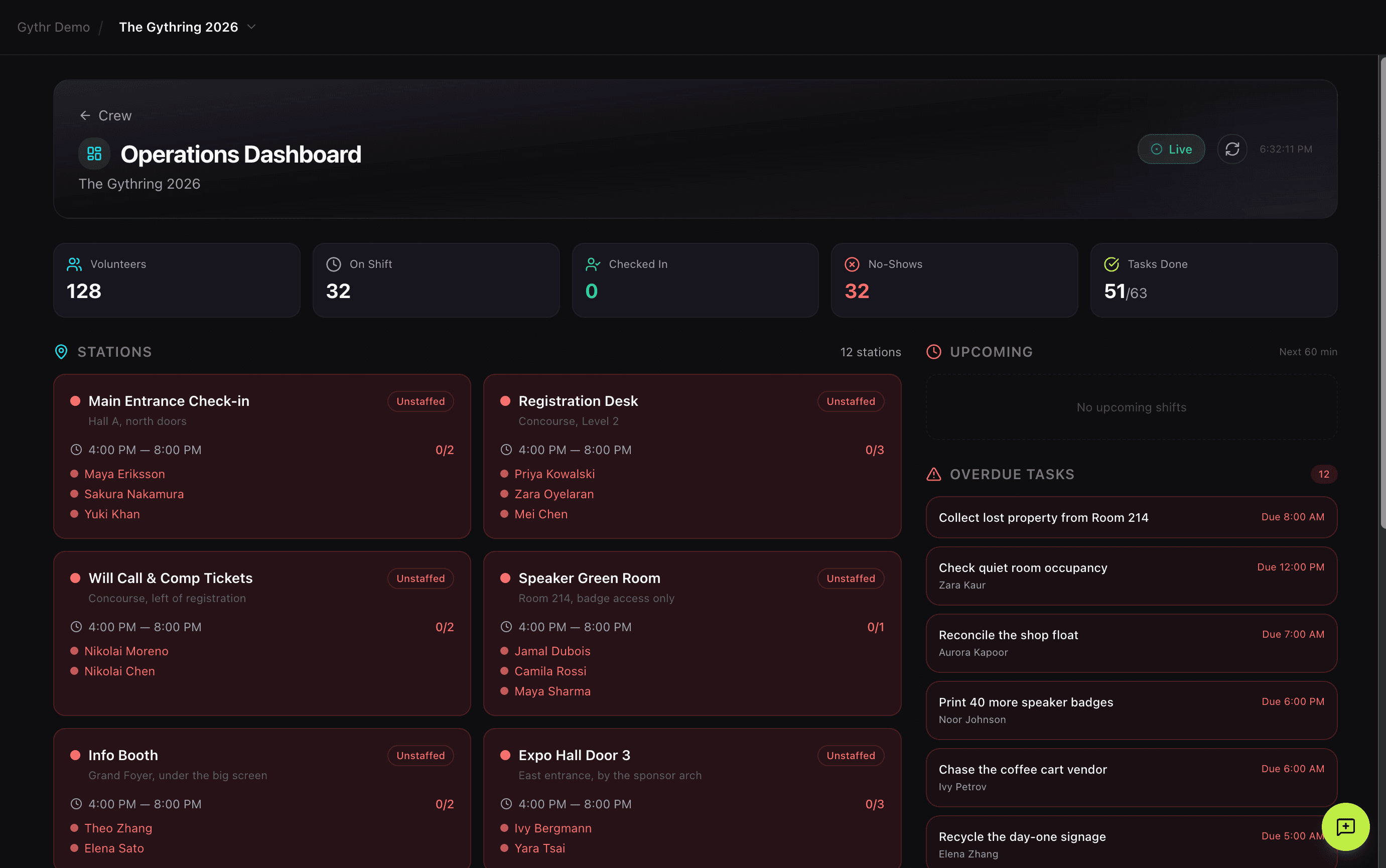
The operations dashboard shows real-time station staffing, who's checked in, upcoming shifts, overdue tasks, and live coverage stats. One screen. One source of truth. Zero spreadsheets.
Powered by AI
Three schedules, three strategies, zero guesswork.
Most shift scheduling is a compromise. You have 40 volunteers, 60 shifts, and three hard constraints you can't violate. You stare at a spreadsheet for two hours and eventually shove people into boxes and hope nobody complains.
Schedule Assistant reads your volunteer availability, your shift requirements, and your coverage needs, then generates three complete schedules, each optimized for a different goal.
Good: Coverage first
Prioritizes filling the most critical shifts first. Best for events where certain stations absolutely cannot be understaffed, like registration, speaker greenroom, or information desk.
Better: Conflict-free coverage
Distributes volunteers across time slots to maximize shift coverage while avoiding scheduling conflicts. Best for events with complex multi-day schedules where volunteer burnout is a real risk.
Best: Balanced workload
Optimizes for even workload distribution with each volunteer covering complementary time periods. Best when you want every volunteer to have a similar experience and no one feels overworked.
Schedule Assistant shows you exactly what each option delivers: shifts filled, role matches, average hours per volunteer, number of conflicts, and any volunteers the AI couldn't place. No black box. You see the math. You choose the strategy. You edit whatever you want before applying. If you don't like any of the options, regenerate. If you like one but want to tweak it, edit it directly. The AI is a starting point, not the final answer.
Everything Crew Can Do
Public volunteer application page
Shareable application form with role selection, availability, and preferences. No account required to apply. Review or auto-approve based on your rules.
Volunteer roster with CSV import
Central database of every crew member with roles, skills, availability, and contact info. Bulk import existing volunteer rosters from previous events.
Shift creation and capacity management
Create shifts with time, role, location, and capacity limits. See coverage gaps at a glance before your event starts.
Shift marketplace
Publish open shifts for volunteers to claim directly from their portal. First-come, first-served with capacity limits. Coverage updates in real time as shifts fill.
Schedule Assistant (AI-powered)
Auto-generate three optimized shift schedules (Good, Better, Best) based on your volunteer availability and coverage needs. Full transparency into what each option delivers.
Magic-link volunteer portal
Every volunteer gets a self-service portal, no login, no password, no account creation. Confirm shifts, check in on arrival, mark tasks complete. Available as a standalone link or inside Gythr Here.
Task assignments
Create tasks, assign to crew members, set priorities and due times, track completion in real time. Your event-day checklist lives in one place.
Volunteer check-in scanner
Flip a toggle and your volunteers can scan attendee badges using the same Gate check-in system. Turn your volunteers into your registration team without separate software.
Operations dashboard
Real-time command center showing station staffing, volunteer check-in status, upcoming shifts, overdue tasks, and live coverage stats. One screen, one truth.
Built for events that treat volunteers like people, not labor.
Crew is a good fit for any event that relies on volunteers, but it's built for organizers who think carefully about how they invite people to participate in building an event.
Most volunteer management tools treat volunteers as a scheduling problem: assign them to a slot, get them a badge, move on. That's fine for big productions where volunteers and attendees never really mix. But most events aren't like that. Most events are communities. And in community-driven events, the line between "attendee" and "volunteer" is blurry on purpose. Volunteers are often the same people who attend, the same people who speak, the same people who bring their friends next year. Treating them well isn't a nice-to-have. It's the whole job.
Crew is built for that kind of event. The kind where volunteers get a real portal, real information, real tools, and a real role. The kind where the organizer doesn't have to apologize for asking people to help because the experience of helping is itself part of what the event offers.
If that sounds like your event, Crew was built for you.
Connected Modules
Crew connects to the rest of your event.
Gate
Volunteers can scan attendee QR codes using the same Gate check-in system. Flip a toggle in Crew and your volunteers become your registration team. All check-ins are recorded identically whether the scanner is a paid staff member or a volunteer.
Stage
Crew members assigned to sessions for setup, A/V, or room monitoring show up in Stage alongside speakers. Session-specific crew assignments flow between the two modules automatically.
Comms
Role-scoped alerts fire to crew members for shift reminders, task assignments, and real-time updates. The same in-app alert system that reaches attendees reaches your crew, scoped appropriately.
Signal
Crew activity, shift coverage, check-in rates, and task completion feed into Signal for real-time operational visibility alongside every other event metric.
Lobby
Crew members see crew-specific Lobby content automatically based on their role. Shift meeting points, break room access, emergency procedures, all visible to them and invisible to general attendees.
Gythr Here
The volunteer portal lives both as a magic-link standalone page AND inside Gythr Here. Volunteers who install the attendee app get a role-gated crew view alongside their attendee experience.
Crew is included on Business and Org.
Unlimited volunteers, unlimited shifts, unlimited Schedule Assistant generations, and unlimited tasks.
Book a demo →Give your volunteers tools that match their effort.
The people running your event deserve better than a spreadsheet. Book a demo and we'll show you Crew running on a real event.